I Like LikeC4
LikeC4 is a 'text to diagram' tool specializing in software architecture. Like the name implies, it is at least inspired by the C4 model, but is in no way restricted to just that terminology.
The LikeC4 DSL (domain specific language) basically boils down to a model that contains one or more elements which have relationships to other elements. These are wrapped in views that can show different aspects of the system at hand - defining a single model but making views of different levels is a powerful feature for communicating different things to different stakeholders. You can try it yourself in the browser playground or by using the VS Code extension.
Here's a small taste demonstrating the DSL. First we use specifications to describe the elements and relationships we're using, then define the model and finally the views
specification {
  element system { //C4 system context level
    notation 'Information system'
  }

  element container //generic C4 container
  //specific container types

  element cont-postgreSql {
    technology 'postgresql'
    notation 'Database'
    style {
      shape storage
      icon: azure:azure-database-postgre-sql-server
    }
  }

  element cont-sqlServer {
    technology 'sql server'
    notation 'Database'
    style {
      shape storage
      icon: tech:microsoft-sql-server
    }
  }

  element cont-apiApp {
    technology 'dotnet'
    notation 'Application'
    style {
      icon: tech:open-api
    }
  }

  element cont-clientApp {
    technology 'react'
    notation 'Application'
    style {
      shape browser
      color green
      icon tech:react
    }
  }

  element user {
    notation 'Person'
    style {
      shape person
    }
  }

  element grouping //generic grouping of similar concepts, unrelated to C4 classifications

  relationship oidc {
    technology 'OIDC'
  }
}

model {
  system auth 'Auth provider'
  system sample-system-1 'Sample system' {
    grouping users 'Users' {
      user u_public 'Public anonymous users'
      user u_internal 'Organization internal users'
      user u_audit 'Auditing'
    }
    cont-postgreSql db 'Database'
    cont-apiApp backend 'API' {
      -> db
    }
    cont-clientApp ui-pub 'Public UI' {
      description 'Public user interface'
      .oidc auth
      -> backend
      u_public -> it
    }
    cont-clientApp ui-intra 'Internal UI' {
      description 'Internal user interface for administration and auditing'
      .oidc auth
      -> backend
      u_internal -> it
      u_audit -> it
    }
  }
}

views {
  view Containers of sample-system-1 {
    title 'Container level'
    include *
    include users.*
    include auth
  }

  view DeploymentPublic of sample-system-1 {
    title 'Deployment / Public'
    group 'dmz.server.01' {
      include ui-pub
    }
    group 'intra.server.02' {
      include backend
    }
    group 'db-server.01' {
      include db
    }
  }

  view DeploymentIntra of sample-system-1 {
    title 'Deployment / Internal'
    group 'intra.server.01' {
      include ui-pub
      include backend
    }
    group 'db-server.01' {
      include db
    }
  }
}
That results in a container level diagram like this:
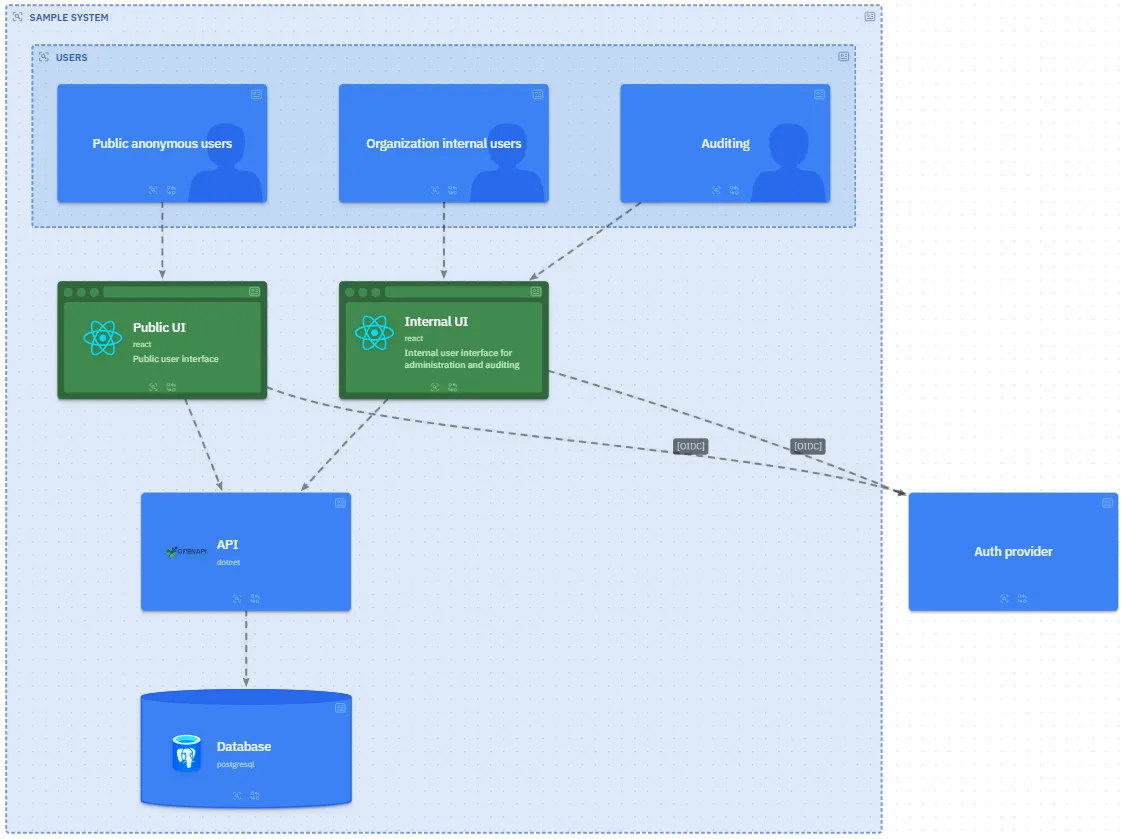
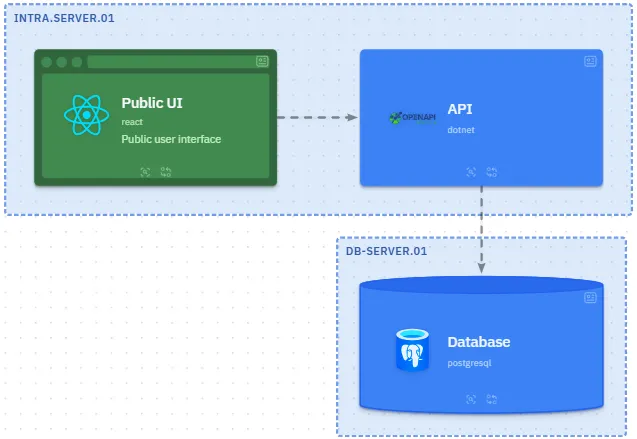
And two 'deployment' diagrams like this:
There's also a classic 'Big Bank' example showcased in the docs.
What's to like
The key points that make it a great fit for my uses:
- writing the specifications with the VS Code extension is painless
- 'single model, multiple views' makes it trivial to communicate different things to programmers, project managers and auditors. Adding a new view to an existing model is very fast
- version control and automatic deployments (it's just an npm build, after all) makes management easy
- multi project support allows for defining dozens of systems (with varying level of detail) while sharing elements, styles etc. between them. Once you have a multi-project setup working, you can easily visualize the relationships and interactions between systems
- dynamic views enable e.g. interactive data flow diagrams, which is useful for different kinds of presentations
It's of course not without issues. As in every 'text to diagram' tool, the renderer can make interesting decisions regarding the layout, but I've had to struggle surprisingly little as yet. If you want to force it, you can manually position things using the VS Code extension. Also, the DSL is a bit too flexible for my liking as there are often two to three different ways to do a thing. For example in a nested relationship you can use -> other it -> other and this -> other to describe the same thing. Of course this can be covered with specifying the conventions (and I guess you could use ESLint or similar to enforce it) but I'd prefer a bit less leeway here nonetheless.
All in all, LikeC4 has been a great boon for my diagramming needs in cases where Mermaid just doesn't cut it.
Thoughts, comments? Send me an email!